
The complete app for equine yard management
The complete app for equine yard management
In the traditional livery model, yard owners often act as short-term creditors. While stable rent is typically paid in advance, “extras” – such as turnout, mucking out, or forage – are usually billed in arrears. This means you might wait up to four weeks to be reimbursed for labour or supplies you’ve already paid for.
LIVERYLive is shifting this paradigm. By utilizing the Pay on Booking feature, yards can capture revenue the moment a service is booked, eliminating “bill shock” for clients and vastly improving yard cash flow.
Transitioning to a pay-ahead system is straightforward. Follow these steps to automate your billing and task management.
To handle secure digital transactions, LIVERYLive integrates with Stripe.
Log in to your LIVERYLive account via the website or app.
Navigate to the Invoice set up tab.
Select Connect Stripe. If you don’t have an account, you can create one during this process. This allows horse owners to pay via card or digital wallet instantly.
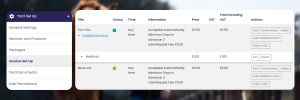
Before you can take payments, you need to tell the system what you offer.
Go to the Services section.
List every “add-on” service available (e.g., Turn Out, Muck Out, Rug Change, Holding for Farrier).
Assign a specific price to each service.
This is the “Revolution” button. When creating your service settings, toggle the option to Take payment on booking.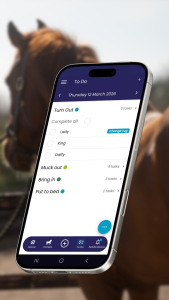
This bypasses the traditional “request and approve” workflow.
As soon as the horse owner pays for the service in their app, a task is immediately created on the yard’s central To-Do List.
Your staff no longer need to check paper diaries or whiteboards.
Staff view the To-Do List and see the requested service.
Once the task (e.g., mucking out) is finished, the staff member clicks Complete.
The system automatically logs this in the billing section as a paid credit.
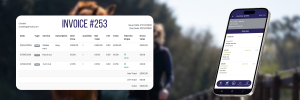
The LIVERYLive system streamlines your end-of-month admin by consolidating rent and pre-paid services into one transparent document.
Example Timeline: The May 1st Invoice
| Item | Coverage Period | Status |
| Stable Rent | May 1st – May 31st | Due (Paid in Advance) |
| Extra Services | April 1st – April 30th | Applied as Credits (Already Paid) |
When you generate the invoice on May 1st, the horse owner sees exactly what they owe for the coming month’s rent. Below that, they see a detailed itemization of every service completed in April, marked as already paid.
Zero Debt Risk: You are never out of pocket for bedding, hay, or staff time.
Reduced Admin: No more chasing “missing” turnouts or rug changes at the end of the month. If it’s on the list, it’s been paid for.
Budget Clarity: Horse owners can manage their spending in real-time, preventing the frustration of a surprisingly high end-of-month bill.